Remote Config는 Unity Gaming Services(UGS) 중 하나로, 사용하기 전에 반드시 UGS 초기화가 되어 있어야 합니다.
using Unity.Services.Core;

await UnityServices.InitializeAsync();
1. Remote Config란?
Remote Config는 Unity에서 제공하는 원격 설정 관리 서비스입니다.
앱을 업데이트하지 않고도 클라우드에서 변수값을 관리할 수 있으며, 다양한 조건에 따라 다른 값을 내려줄 수도 있습니다.
주요 특징
- 앱 업데이트 없이 변수 즉시 조정 가능 (밸런스, 보상, 난이도 등)
- 플랫폼, 국가, 앱 버전, A/B 테스트 그룹에 따라 조건부 값 제공 가능
- 대규모 이벤트, 시즌제 보상, 긴급 밸런스 조정 등에 유용
// 전체 Config Fetch
await RemoteConfigService.Instance.FetchConfigsAsync(userAttributes, appAttributes);

// 특정 값 가져오기
RemoteConfigService.Instance.appConfig.GetBool("KeyName");
RemoteConfigService.Instance.appConfig.GetInt("KeyName");
RemoteConfigService.Instance.appConfig.GetString("KeyName");
2. Remote Config 설치하기
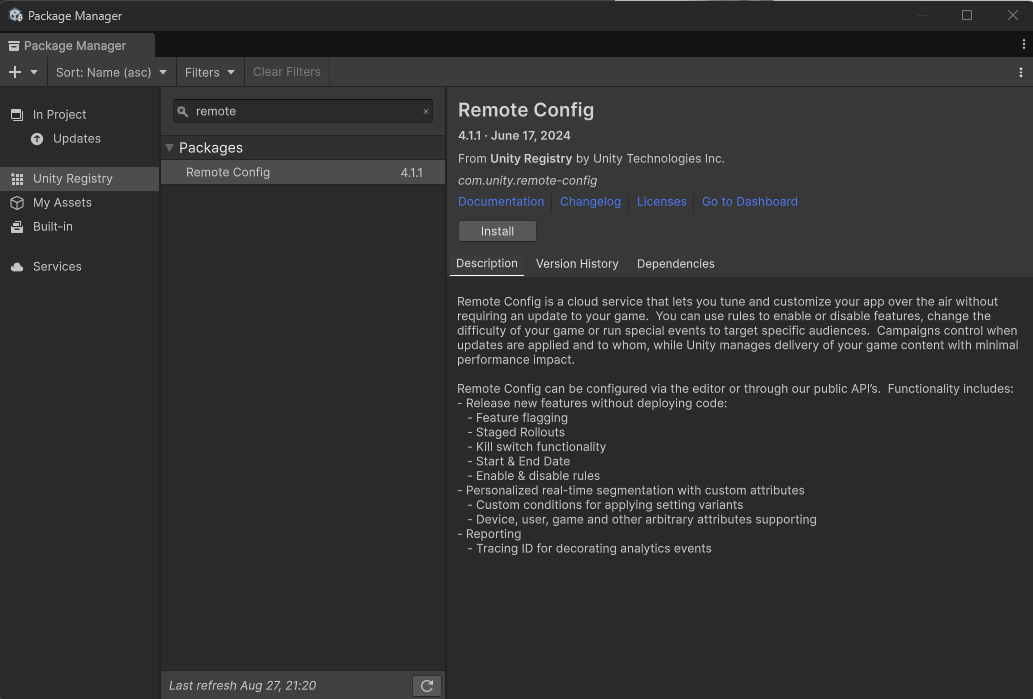
Package Manager에서 Remote Config를 설치 후
Window → Remote Config 메뉴 활성화 확인
3. 테스트 예제
간단히 TextMeshPro를 이용해 무기 레벨을 표시하는 예제입니다.
public class RemoteConfigTest : MonoBehaviour
{
    [SerializeField] private TextMeshProUGUI remoteConfigText;
    [SerializeField] private int generalLevel;
    private async void Start()
    {
        generalLevel = 33;
        remoteConfigText.text = $"현재 무기 레벨: {generalLevel}";
    }
}
현재는 단순히 33이라는 숫자를 직접 보여줄 뿐, Remote Config와는 연결되지 않았습니다.

따라서 현재 무기는 33레벨이라고 보여지고 있습니다.
Unity 공식에서 소개하는 OnConfigFetched 이벤트 방식
Unity 공식 문서/유튜브에서는 이벤트 기반 방식을 소개합니다.
Fetch 완료 시점에 OnConfigFetched 콜백이 호출되며, 이때 값을 세팅하면 됩니다.
아래 영상에서 자세한 내용을 확인할 수 있습니다 .
https://www.youtube.com/watch?v=RL3-VY8runI
using Unity.Services.RemoteConfig;
using UnityEngine;

public class RemoteConfigManager : Singleton<RemoteConfigManager>
{
    private struct userAttributes { }
    private struct appAttributes { }

    public int level { get; private set; }

    private void Start()
    {
        // 이벤트 등록
        RemoteConfigService.Instance.FetchCompleted += OnFetchCompleted;

        // Fetch 실행
        RemoteConfigService.Instance.FetchConfigs(new userAttributes(), new appAttributes());
    }

    private void OnFetchCompleted(ConfigResponse response)
    {
        level = RemoteConfigService.Instance.appConfig.GetInt("PowerUP_Event", 0);
        Debug.Log($"[RemoteConfig] PowerUP_Event Level: {level}");
    }
}
이벤트 기반은 동기방식이므로 FetchConfigs를 사용합니다.
using TMPro;
using UnityEngine;

public class RemoteConfigTest : MonoBehaviour
{
    [SerializeField] private TextMeshProUGUI remoteConfigText;
    [SerializeField] private int generalLevel;

    private void OnEnable()
    {
        // RemoteConfigManager가 fetch 완료될 때 UI 갱신
        RemoteConfigService.Instance.FetchCompleted += OnRemoteConfigFetched;
    }

    private void OnDisable()
    {
        RemoteConfigService.Instance.FetchCompleted -= OnRemoteConfigFetched;
    }

    private void OnRemoteConfigFetched(ConfigResponse response)
    {
        generalLevel = RemoteConfigManager.Instance.level;
        remoteConfigText.text = $"현재 무기 레벨: {generalLevel}";
    }
}
TaskCompleteSource<T> 방식
TaskCompletionSource<T>는 비동기 프로그래밍에서 쓰이는
'나만의 Task를 만들고, 완료 시점을 내가 직접 정해줄 수 있는 메서드' 입니다.
Unity RemoteConfig처럼 이벤트 기반 API는 Task를 바로 반환하지 않고, OnConfigFetched 이벤트만 주므로
TaskCompletionSource<T>를 쓰면 이벤트 기반을 await 가능한 Task로 감싸줄 수 있습니다.
public class RemoteConfigManager : Singleton<RemoteConfigManager>
{
    private struct userAttributes { }
    private struct appAttributes { }

    public int level { get; private set; }

    private TaskCompletionSource<bool> configFetch = new TaskCompletionSource<bool>();

    private async void Start()
    {
        await FetchRemoteConfig();
    }

    private async Task FetchRemoteConfig()
    {
        // RemoteConfig 가져오기
        await RemoteConfigService.Instance.FetchConfigsAsync(new userAttributes(), new appAttributes());

        // 값 설정
        level = RemoteConfigService.Instance.appConfig.GetInt("PowerUP_Event");

        // 완료 알림
        configFetch.TrySetResult(true);
    }

    // 외부에서 호출할 때 대기 하는 기능입니다.
    public Task WaitForConfig()
    {
        return configFetch.Task;
    }
}
동작 방식
var tcs = new TaskCompletionSource<bool>();

// 1. Task를 외부에 노출
Task task = tcs.Task;

// 2. 특정 시점에서 완료시키기
tcs.SetResult(true);   // 성공
// tcs.SetException(ex); // 실패
// tcs.SetCanceled();    // 취소
UI 코드에서는 이렇게 await으로 기다릴 수 있습니다:
public class RemoteConfigTest : MonoBehaviour
{
    [SerializeField] private TextMeshProUGUI remoteConfigText;
    [SerializeField] private int generalLevel;
    private async void Start()
    {
        // RemoteConfigManager가 데이터를 가져올 때까지 기다림
        await RemoteConfigManager.Instance.WaitForConfig();

        generalLevel = RemoteConfigManager.Instance.level;
        remoteConfigText.text = $"현재 무기 레벨: {generalLevel}";
    }
}
waitForConfig를 통해 데이터를 기다린 후 가져옵니다. 저는 66으로 설정하였습니다. (2배 이벤트 가정)

66으로 자동으로 반영되었습니다.
Unity Dashboard 설정
Remote Config 값을 사용하려면 Unity Dashboard → Remote Config에서 키를 등록해야 합니다.
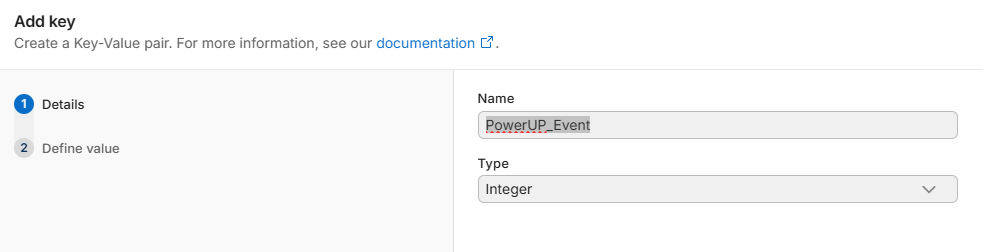
이름과 타입을 지정합니다.

값도 지정해줍니다.
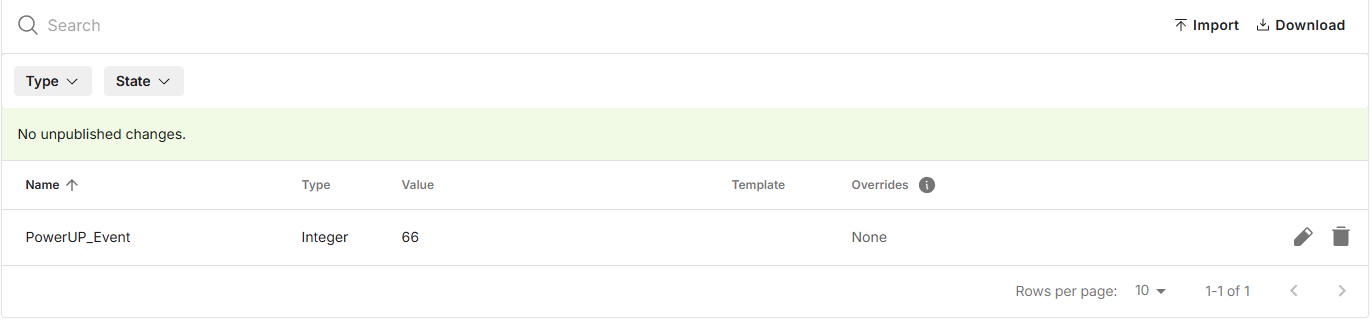
반영된 모습입니다.
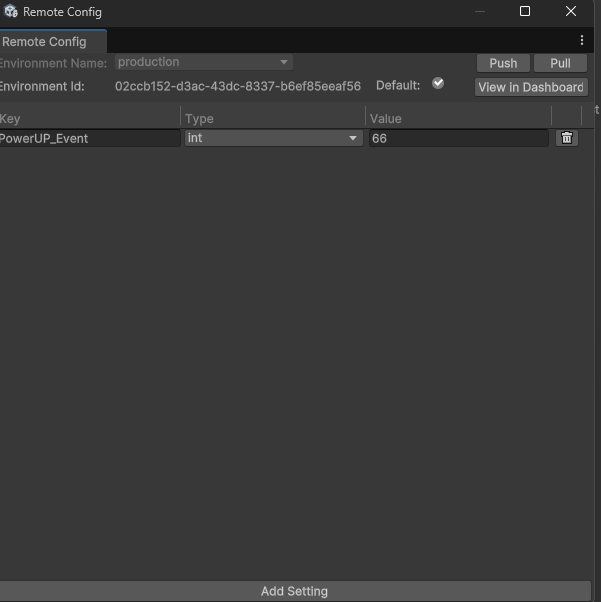
Window → Remote Config에서도 git처럼 값을 Push하거나 Pull 해서 동기화 할 수 있습니다.
'Unity > UGS' 카테고리의 다른 글
| [Unity] Analytics (0) | 2025.08.30 |
|---|---|
| [Unity] UGS Cloud Save (1) | 2025.08.27 |
| [Unity] UGS로 로그인 기능 구현하기 (0) | 2025.04.28 |